Skip to content
Automation Club
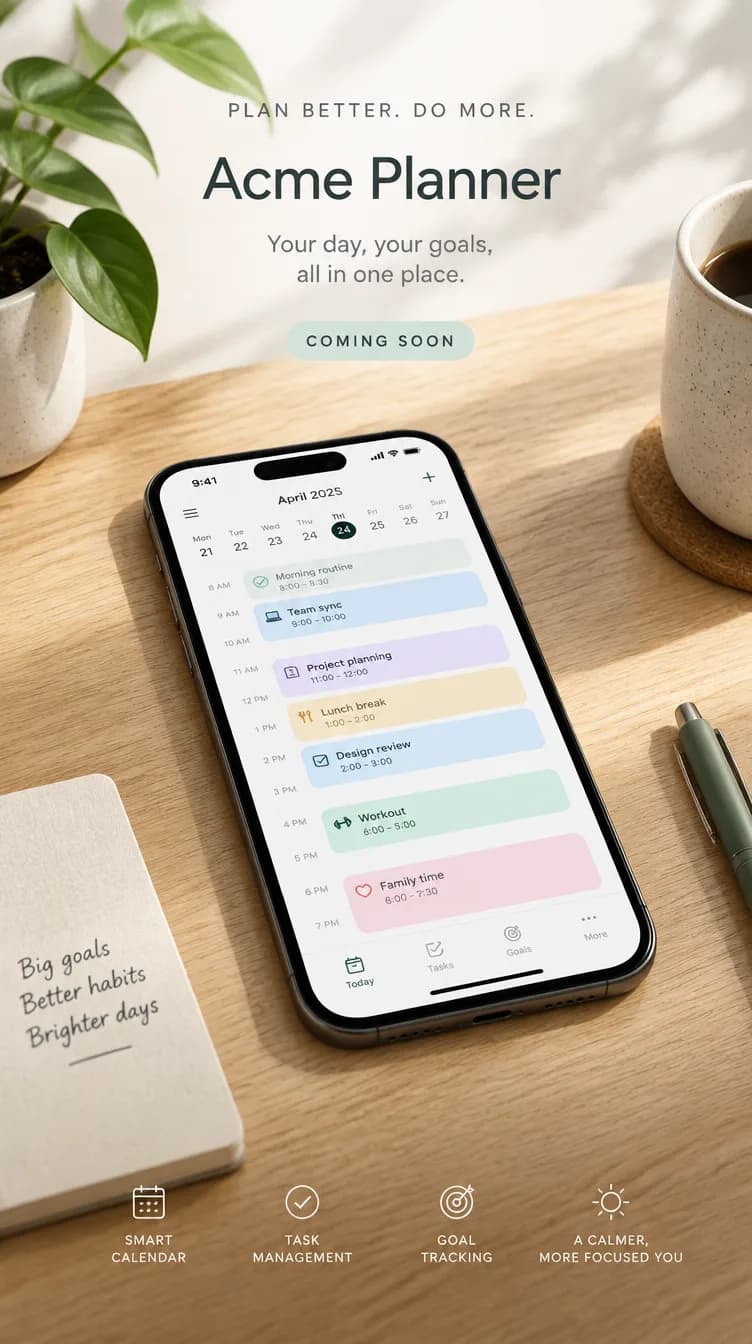
  • Launch poster: the title Acme Planner, the line Your day, your goals, all in one place, and Coming soon, above a phone on a light oak desk showing a calendar0:08
    Opens on the title Acme Planner and the line Your day, your goals, all in one place, above a phone on a light oak desk in soft daylight. The title fades as the camera pushes in and the calendar on the phone scrolls through a day of tasks. No people.
    Made with Claude · PromptExample output

    Video

    Teaser for Acme Planner. Prompts written in Claude; poster made with GPT Image 2.5, motion with Kling 3.0. Acme Planner is a made-up product.

  • MarkdownLaunch teaser plan for Acme PlannerExample output

    Launch teaser plan for Acme Planner

    Eight seconds, vertical 9:16


    The idea

    A phone on a desk quietly fills a week with tasks, so the viewer sees the result of the app, not its menus.

    Shot plan

    BeatSecondsWhat we see
    10 to 2A phone on a light oak desk in soft daylight, the week on screen still empty
    22 to 6Tasks drop into the calendar one by one while the camera slowly pushes in
    36 to 8Hold on the full week, with clear space at the top for a caption

    Poster frame prompt

    Vertical poster frame for a launch teaser of Acme Planner, a fictional planning app: a phone on a light oak desk showing a calendar filling with tasks, soft daylight, no faces, no real logos.

    Motion prompt

    The calendar on the phone fills with tasks one by one, gentle push-in, soft daylight, no faces, no text overlays.

    Captions

    • Instagram Reels: Your week, planned before Monday starts. Acme Planner arrives [launch date].
    • TikTok: Watch a whole week sort itself out. Acme Planner, [launch date].
    • YouTube Shorts: Every task in its place, in eight seconds. Acme Planner launches [launch date].
    Made with Claude · Prompt

    Markdown · Document

    The plan the prompt writes. The text output for Acme Planner, a made-up product. The poster and motion in the video example were made from these two prompts.

Works with

  • Claude
  • Claude Code
  • ChatGPT
  • +24 more

Not affiliated with or endorsed by the companies shown.

Product launchPromptMembers

Make an eight-second launch teaser

Describe your product and get a shot plan, a poster frame prompt and a video prompt for a vertical teaser.

Version 1.0Updated 6 Oct 2026

Needs access to
None
Permissions
None
Time to result (our estimate)
5 minutes to set up, 25 minutes a run

Fit

About this item

Tell it what you are launching and who for. It plans an eight-second vertical teaser in three beats, writes a prompt for the poster frame, then a motion prompt to turn that frame into video, and adds a caption for each platform.

The example was made for Acme Planner, a made-up planning app: the poster first, then eight seconds of motion from it.

What you get

  • A three-beat shot plan
  • A poster frame prompt
  • A motion prompt for image-to-video
  • Captions for three platforms

Good fit

  • Teasing a launch on Reels, TikTok and Shorts the week before

Not for

  • Explainer videos or anything longer than about ten seconds

Who it is for

Skill level: Use AI weekly

How to use

How to use it

In Claude

  1. Copy the prompt with the button above.

  2. Open Claude and paste it into a new chat.

In Claude Code

  1. Copy the prompt with the button above.

  2. Paste it into Claude Code.

Same steps in

  • ChatGPT
  • Gemini
  • Grok
  • Perplexity
  • Microsoft Copilot
  • Mistral Le Chat
  • DeepSeek
  • Meta AI
  1. Copy the prompt with the button above.

  2. Open your AI tool and paste it into a new chat.

Same steps in

  • Cursor
  • Codex
  • Gemini CLI
  • GitHub Copilot
  • VS Code
  • Amp
  • Goose
  • OpenCode
  • Junie
  • Roo Code
  • Kiro
  • Letta
  • Manus
  • OpenClaw
  • Hermes
  • Muse
  • Dots
  1. Copy the prompt with the button above.

  2. Paste it into your AI tool.

Trust

What's inside

  • prompt.md1.4 KB

File names and sizes only. The files come with membership.

Permissions required

None

Requirements

You bring

  • A sentence about your product
  • Who it is for

Outside costs

  • Image and video generation credits: Our estimate: $1 to $3 a teaser

Tested on

VerifiedTested in the last 90 days
  • Claude8 Oct 2026
  • ChatGPT7 Oct 2026

Known limitations

  • The prompt plans and writes the video prompts. Making the video needs an image-to-video tool.
  • Video tools still struggle with readable text and faces, so the plan avoids both.

More

Used in these systems

Questions

Why start from a still image?
You get to approve the look before you spend credits on motion, and the poster doubles as the video's cover image.
Which video tools does it work with?
Any tool that turns an image into a short clip. The prompts use plain camera language that those tools understand.