Skip to content
Automation Club
  • Fresh beans, every other Friday | Northwind Coffee
    northwind.example.comExample output
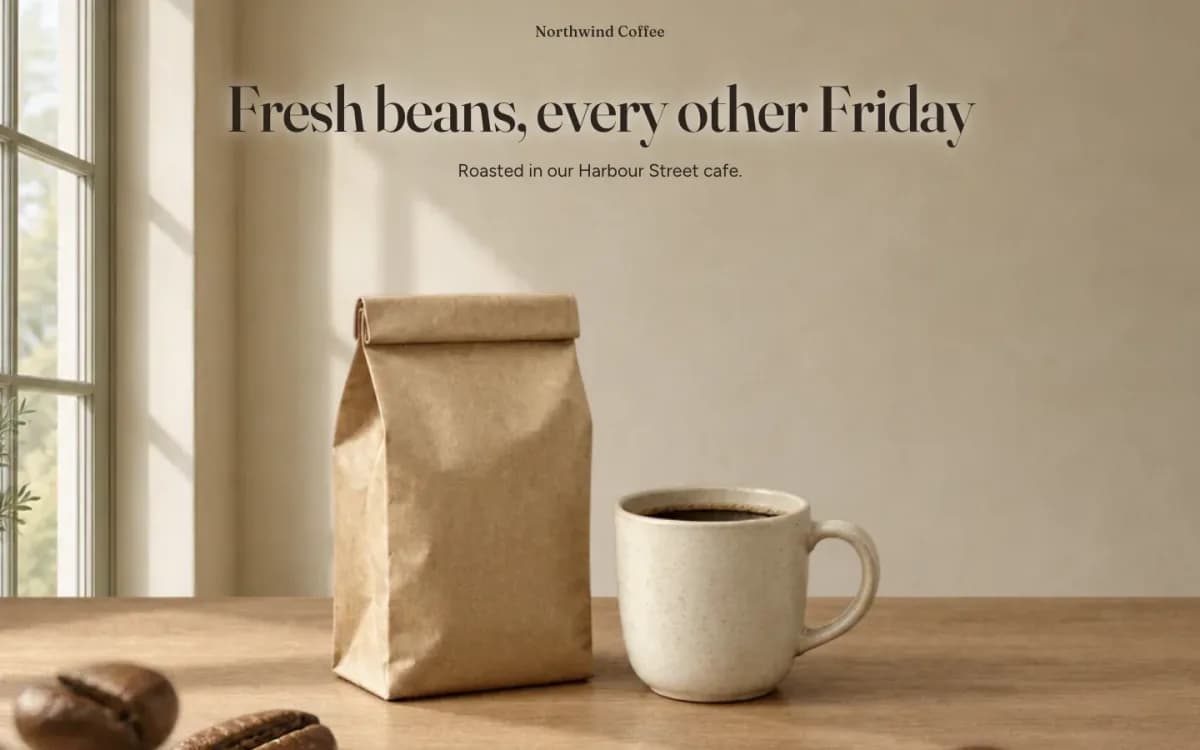
    Desktop hero: the headline Fresh beans, every other Friday over a pale kitchen wall, with a kraft bag and a cup on an oak counter and beans close to the lens
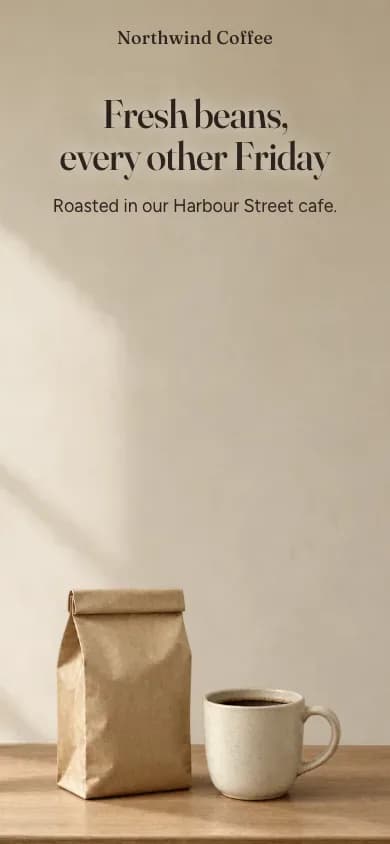
    Phone hero: the same headline above the bag and the cup
    Made with Claude Code · Skill

    Web page

    The finished scroll story. Built by the skill for Northwind Coffee, a made-up roaster, from its seven planned images. The hero, then the peak, as Tuesday opens into Friday.

  • A frame from the start: the Northwind Coffee hero on desktop0:35
    A 35 second scroll through the Northwind Coffee scroll story: the three-layer hero, the freshness scale filling, the row of bags sliding in, the roaster opening into the Friday kitchen at the peak, then the price and the button.
    Made with Claude Code · SkillExample output

    Video

    Scrolling through it. A screen recording of the built page on desktop, scrolled with a mouse wheel from top to bottom. No sound.

  • MarkdownBeat plan: Northwind CoffeeExample output

    Beat plan: Northwind Coffee


    Thanks, that covers all five questions. Below is the beat plan. I won't build anything until you approve it.

    The story: six beats, about 9.5 screens of scroll, one peak (beat 4).

    #BeatWhat the visitor seesWords on screenThe one motionLength
    1ArrivalMorning window light on a wooden counter, with a kraft bag of beans, a ceramic cup and a few loose beans close to the lens. It's built from three planes: window and wall at the back, counter with bag and cup in the middle, loose beans as a foreground cut-out.Fresh beans, every other Friday / Roasted in our Harbour Street cafe.The three planes drift apart at different speeds, so the scene opens up in depth.2 screens
    2Why fresh mattersA close-up of a bag's blank roast-date label on Oat Linen. Beside it is a simple five-week line drawn in HTML.Most beans taste best one to five weeks after roasting. / We print the roast date on every bag.The one-to-five-week stretch of the line fills in with Kitchen Sage.1.5 screens
    3How it worksFour unlabelled bags in a row on linen. Their names are real text underneath.Pick your beans. Every two weeks or every four. / House filter, single origin, espresso, decafThe row of bags slides in as one layer, and the names settle once it stops.1.5 screens
    4PEAKTuesday is beans cooling in the roaster tray at the cafe. Friday is the same bag on a kitchen table beside a full cup, in morning light.Roasted Tuesday. then In your cup by Friday.The biggest move on the page: the Tuesday scene scales up and opens into the Friday scene. "Roasted Tuesday." appears once the cafe scene has settled, and "In your cup by Friday." once the kitchen has settled.2.5 screens, pinned
    5PriceA calm Pale Sage panel with no moving images.From $15 a bag. / Delivery is $5, free over $40.The text fades in. Nothing else moves.1 screen
    6ActionFilter Paper background with the button in Roast Brown.Start my subscription / Skip or cancel any time from your account.None. This beat isn't pinned.1 screen

    With reduced motion turned on, and on a phone, every beat still reads as a plain section in this order, with no pinning.

    Copy trims. Each beat can hold at most twelve words, so I've shortened some lines. Tell me if any of these should stay word for word:

    • Hero line: I took out "on Tuesday" and "At your door by Friday" so the peak is the first place the Tuesday-to-Friday promise appears. If you'd rather keep your full line in the hero, the peak will repeat it.
    • Bean names: "Single origin of the month" becomes "single origin", and "espresso blend" becomes "espresso".
    • Freshness: "So yours arrive at the start of that window" is gone, because the peak makes that point.
    • Delivery choice: "Choose every two weeks or every four" now sits inside the beat 3 heading.

    Next: once you approve the beats, I'll list every image you need to make. Each entry will give its job (back, middle or foreground cut-out), its size and a prompt in your photo style: soft window light from the left, muted warm tones, fine grain, two or three objects in a frame and no people. I'll keep the total under 3 MB.

    Two questions:

    1. Shall I go ahead with these six beats?
    2. Are the copy trims okay, or does any line need to stay exactly as written?
    Made with Claude Code · Skill

    Markdown · Document

    Step 2: the beat plan. Six beats and one peak, planned from the brief before anything was built.

  • MarkdownAsset plan: Northwind CoffeeExample output

    Asset plan: Northwind Coffee


    Thanks, I've noted all three:

    • Name: Northwind Coffee goes in the page title and the footer.
    • Button: both the button and the footer link go to https://northwind.example.com/subscribe.
    • Footer: hello@northwind.example.com and your two cafes, Harbour Street and the Old Mill.

    I've created the assets/ folder in the site. There are seven images to make. Beats 5 and 6 (price and the button) use no images.

    Paste this style line at the start of every prompt so all seven images look like one shoot:

    Photograph, soft morning window light from the left, natural materials (wood, linen, ceramic, kraft paper), muted warm tones of cream, oat, roast brown and soft sage, fine film grain, calm and uncluttered, no people, no hands, no text, no lettering, no logos.

    #File nameBeat and jobShapeBackgroundPrompt (after the style line)
    1arrival-backArrival, back planeLandscape 3:2Full sceneAn empty kitchen corner: a pale plaster wall with a tall window on the left letting in soft morning light, a soft shadow of the window frame on the wall. Nothing on the counter. The upper half of the frame is plain, evenly lit wall.
    2arrival-midArrival, middle planeLandscape 3:2TransparentThe front edge of a light oak counter running across the bottom third of the frame. On it are an unlabelled kraft paper coffee bag with a folded top and a plain cream ceramic cup of black coffee, side by side near the centre. Everything above the counter is transparent.
    3arrival-frontArrival, foreground cut-outLandscape 3:2TransparentSix to eight roasted coffee beans scattered loosely along the bottom edge, very close to the camera and slightly out of focus. Everything else is transparent.
    4fresh-labelWhy fresh mattersSquare 1:1TransparentA close-up of the front of a kraft paper coffee bag, slightly angled, with a small blank cream paper label stuck on it. The label is completely empty. The bag only, cut out.
    5how-bagsHow it works, one sliding layerWide, about 2:1TransparentFour identical kraft paper coffee bags standing in a straight row, evenly spaced, seen straight on at eye level. Each has a plain paper band in a different muted colour: cream, soft sage, roast brown, oat. No labels or writing. The bags only, cut out.
    6peak-tuesdayPeak, first scene (Tuesday)Landscape 3:2Full sceneInside a small cafe roastery in the early morning: freshly roasted coffee beans cooling in the round metal tray of a small shop roaster, seen from slightly above. A brick or plaster wall behind, in light from a window on the left. The top third of the frame is quiet, plain wall.
    7peak-fridayPeak, second scene (Friday)Landscape 3:2Full sceneA wooden kitchen table at home in the morning: the same kraft paper coffee bag as before, opened, beside a full cream ceramic cup of filter coffee. Linen cloth on the table, window light from the left. The top third of the frame is quiet, plain wall.

    Tips for making them

    • Order: make them in the order listed. Use arrival-back as a reference image for the other arrival images, and arrival-mid as the reference for the bag in 4, 5 and 7, so the light and the bag stay the same across the page.
    • Transparent backgrounds: images 2 to 5 need them. In ChatGPT, ask for "a PNG with a transparent background". In Higgsfield, use its background remover afterwards. Keep the soft edges, and don't add drop shadows.
    • Phone crops: keep the main objects in the middle third of the frame. On a phone I crop the sides to fit a tall screen.
    • Space for words: the plain wall in images 1, 6 and 7 is where the headlines go, which keeps the text easy to read against it. If an image comes back busy at the top, regenerate it.
    • Size: export each image at least 1600 pixels wide. PNG or JPG is fine. I'll convert everything to WebP at 1600 pixels wide or less, so the seven together come to roughly 1.5 MB, well under the 3 MB budget.
    • File names: save each file into assets/ with the name in the table, for example assets/peak-friday.png.

    Let me know when they're in the folder and I'll build the page, then run the desktop, phone and reduced-motion checks.

    Made with Claude Code · Skill

    Markdown · Document

    Step 3: the asset plan. Seven images with their jobs, shapes and prompts. The page images were made from them, with a reference image where the plan asks for one.

  • MarkdownBuild and self-check reportExample output

    Build and self-check report


    The page is built, and the self-check passed with no problems on desktop, on a phone and on a phone with reduced motion. I changed a few things after looking at the screenshots and ran the check again before calling it done.

    What's in the site folder

    • index.html is the whole page: all six beats, then a footer with Northwind Coffee, the subscribe link, hello@northwind.example.com and your Harbour Street and Old Mill cafes. The button and the footer link both go to https://northwind.example.com/subscribe.
    • assets/ now holds a WebP copy of each of your seven PNGs. Together they come to 0.4 MB, well under the 3 MB budget.
    • self-check/ has 26 screenshots of the whole page on desktop, on a phone and with reduced motion, if you want to look through every beat.

    How each beat came out

    1. Arrival: the wall, the counter and the foreground beans move at three different speeds. On a phone the beans rise into view from below.
    2. Why fresh matters: the sage band fills weeks one to five on the scale, then "We print the roast date on every bag" appears.
    3. How it works: the row of bags slides in from the right, then the four names settle under their bags.
    4. Peak: the roaster scene settles and "Roasted Tuesday." appears. Over about two screens of scroll the kitchen scene opens out from the middle while the roaster pushes in behind it, then "In your cup by Friday." lands under it. On a phone the words sit on Filter Paper above a framed picture, so the bag and the cup both fit.
    5. Price: the two lines fade in on the Pale Sage panel, and nothing else moves.
    6. Action: the Roast Brown button with "Skip or cancel any time from your account." under it. This beat isn't pinned and nothing moves.

    With reduced motion on, every word and picture shows in order, and nothing is pinned or moving.

    What I fixed during the checks

    • In the hero, the bag was rising into the line under the headline on desktop. I reframed the planes so it stays clear.
    • On phones, the rising beans showed a hard cut edge at the bottom of the image. I extended them below the screen.
    • Headlines over the photos had their weakest spots at about 3.6 to 1 against the busier parts of the roaster scene. That already passes for large text, but I added a soft halo in your Filter Paper colour. Now the weakest spots are about 4 to 1 for the peak headline and 4.7 to 1 for the hero headline. All body text is at least 6 to 1.
    • The price and button sections left a lot of empty space between them, so I tightened them a little.
    • The bag in beat 2 has a blank label, so screen readers now skip it as decoration instead of announcing a roast date that isn't there.

    Things to know

    • Image sharpness: your images are 1024 pixels wide, so the full-screen scenes (hero and peak) look slightly soft on large desktop screens. Phones look fine. If your tool can upscale those three (arrival-back, peak-tuesday, peak-friday) to 1600 wide, drop them in under the same names and I'll convert them again.
    • Fonts: Fraunces and Figtree load from Google Fonts, and the footer says so. I can host them with the page instead, so visitors never contact Google. That means downloading four small font files from Google Fonts into assets/, so tell me if you'd like that.
    • Uploading: upload index.html and the .webp files in assets/. Leave out the original PNGs, self-check/ and node_modules/.

    Please check these by hand On your computer:

    • To do Scroll slowly from top to bottom. Something changes on every screen.
    • To do The peak is clearly the biggest moment, and it never snaps.

    On your phone, in the browser:

    • To do Scrolling feels like any other page, with no lag and no jumps when the address bar hides.
    • To do Nothing scrolls sideways.
    • To do The button is easy to tap.

    With reduced motion turned on (iPhone: Settings, Accessibility, Motion; Mac: System Settings, Accessibility, Display):

    • To do Every scene and every word appears in order, with nothing pinned or moving.

    Let me know how it feels, or anything you'd like changed.

    Made with Claude Code · Skill

    Markdown · Document

    Steps 4 and 5: the build and the self-check. What the build holds, what the self-check found, and what the run fixed after looking at its own screenshots.

Works with

  • Claude
  • Claude Code
  • ChatGPT
  • +18 more

Not affiliated with or endorsed by the companies shown.

Turn your landing page into a scroll story

One HTML file where your page unfolds in beats as people scroll, with depth, one big moment and a self-check.

Version 1.0Updated 12 Oct 2026

Needs access to
None
Permissions
Reads files you give it, writes files in a folder and runs code on your computer
Time to result (our estimate)
15 minutes to set up, 90 minutes a run

Example

Example session

  1. Steps 1 and 2: Brief and beats
  2. You

    Turn our landing page into a scroll story. Here are your five answers up front.

  3. Your AI

    Thanks, that covers all five questions. Below is the beat plan. I won't build anything until you approve it.

  4. Step 3: Plan the assets
  5. You

    Go ahead, the six beats look right and the trims are fine. Please list the images and their prompts.

  6. Your AI

    I've created the assets/ folder in the site. There are seven images to make. Beats 5 and 6 (price and the button) use no images.

  7. Steps 4 and 5: Build and self-check
  8. You

    The seven images are in the site's assets folder now. Please build it and run the self-check.

    • assets/
  9. Your AI

    The page is built, and the self-check passed with no problems on desktop, on a phone and on a phone with reduced motion. I changed a few things after looking at the screenshots and ran the check again before calling it done.

What comes out
Fresh beans, every other Friday | Northwind Coffee
northwind.example.comExample output
Desktop hero: the headline Fresh beans, every other Friday over a pale kitchen wall, with a kraft bag and a cup on an oak counter and beans close to the lens
Phone hero: the same headline above the bag and the cup
Made with Claude Code · Skill

Fit

About this item

A scroll story turns a landing page into something people remember: the message arrives in four to six beats as the visitor scrolls, over layered images that move at different speeds, building to one big moment and ending on a single clear action.

This skill plans the beats and every image, builds the page as one HTML file, and checks it on desktop, on a phone and with motion turned off. The example is a real run for Northwind Coffee, a made-up roaster, built with images made from the skill's own asset plan.

What you get

  • A beat plan with one peak, and an asset plan with a prompt or stock search for every image
  • One HTML file with layered scenes, pinned beats and smooth scrolling on desktop
  • A page that reads in full with reduced motion and works on a phone
  • A self-check of errors, missing images, dead scroll, overflow and contrast, with screenshots

Good fit

  • Founders and designers who want a launch or product page people remember
  • Turning a page made with the landing page boilerplate into something more striking

Not for

  • Pages that must work without JavaScript for everything
  • Long pages with many products or sections

Who it is for

Skill level: Build with agents

How to use

How to use it

In Claude

  1. Download the skill zip.

  2. In Claude on the web or the desktop app, open Settings, then Capabilities, and turn on Code execution and file creation. On a Team or Enterprise plan, an owner turns this on first.

  3. Open Customize, then Skills. Choose +, then Create skill, then Upload a skill, and pick the zip.

In Claude Code

  1. Download and unzip the skill.

  2. Move the scroll-story folder into your Claude Code skills folder.

    macOS and Linux
    ~/.claude/skills/scroll-story/
    Windows
    %USERPROFILE%\.claude\skills\scroll-story\
  3. Start a new Claude Code session. It loads the skill when the task needs it.

In ChatGPT

  1. Download and unzip the skill.

  2. In ChatGPT, choose New project in the sidebar.

  3. Open Project settings from the project menu and paste SKILL.md from the scroll-story folder into its instructions.

  4. Add the skill's other files (anything in its references or assets folder) to the project. Then chat inside the project.

Same steps in

  • Cursor
  • Codex
  • Gemini CLI
  • GitHub Copilot
  • VS Code
  • Amp
  • Goose
  • OpenCode
  • Junie
  • Roo Code
  • Kiro
  • Letta
  • Manus
  • OpenClaw
  • Hermes
  • Muse
  • Dots
  1. Download and unzip the skill.

  2. Move the scroll-story folder into your skills folder.

    macOS and Linux
    ~/.agents/skills/scroll-story/
    Windows
    %USERPROFILE%\.agents\skills\scroll-story\
  3. Start a new session in your AI tool. It loads the skill when the task needs it.

In Grok

  1. Download the skill zip.

  2. Add the zip in the skills or project settings of Grok.

Trust

What's inside

  • scroll-story folder
    • references folder
      • beats.md2.3 KB
      • build.md6.2 KB
      • self-check.md2.4 KB
      • video-scrub.md2.0 KB
    • scripts folder
      • self-check.mjs11.1 KB
    • SKILL.md4.6 KB

File names and sizes only. The files come with membership.

Permissions required

  • Reads files you give it

  • Writes files in a folder

  • Runs code on your computer

Requirements

You bring

Outside costs

  • Image generation credits, if you make the images with AI: Varies by tool (our estimate)

Tested on

VerifiedTested in the last 90 days
  • Claude Code · Claude Opus 5.512 Oct 2026 · Full run with the shipped skill files for a made-up roaster, with images made from the skill's asset plan and the self-check script run in Chromium.

Known limitations

  • It builds one page. Multi-page sites, shops and forms that save data need more than this skill.
  • The automatic self-check needs a computer that can run code. In a chat app you get the same checks as a list to do by hand.
  • The video scrub add-on needs FFmpeg on a computer and is optional. It was not part of our test run.
  • Hosting the page is up to you. The landing page boilerplate's go-live steps work for it too.

More

Questions

Do I need Claude Code?
No. Claude can build the page in a chat and give you the file. Claude Code, or another coding agent, can also run the automatic self-check and fix what it finds.
What does it use under the hood?
Plain HTML and CSS with two small open-source libraries loaded from a CDN, Motion for scroll animation and Lenis for smooth scrolling on desktop. Both are MIT licensed, pinned to exact versions, and not bundled with this skill.
Will it work for people who turn off motion?
Yes. With reduced motion on, every scene and word shows in order with nothing pinned or moving. The self-check tests that.
Where do the images come from?
Your own photos, free stock sites, or an image tool. The skill plans each image and writes the prompt or search term. It never needs a paid API.